 how-to
Why Website Traffic Is Dropping: 9 Root Causes & Fixes
Table of Contents
- Why Website Traffic Is Dropping: The Diagnostic Framework
- Sudden vs. Gradual Traffic Drops: What You're Actually Seeing
- Google Algorithm Update Impact on Your Rankings
- Technical SEO Audit Checklist for Traffic Recovery
- Indexing Issues and Robots.txt Problems
- Tracking Misconfigurations and Analytics Blind Spots
- Seasonal Trends and Search Volatility
- Website Traffic Recovery Strategy: Step-by-Step
- Verifying Your Traffic Drop with Third-Party Tools
- Conclusion: Moving Forward After a Traffic Drop
Last Updated: August 11, 2026
Why Website Traffic Is Dropping: The Diagnostic Framework
When your website traffic suddenly declines, panic is natural. But before overhauling your SEO strategy, you need to understand what's actually happening. The difference between a genuine ranking loss and a data collection error can mean the difference between a quick fix and months of wasted effort.
This guide walks you through the nine most common reasons your organic traffic is declining, how to identify which one applies to your situation, and exactly what to do about it.
Sudden vs. Gradual Traffic Drops: What You're Actually Seeing
Sudden drops (traffic fell 20-50% overnight or within days) typically signal a technical issue, manual action, or major algorithm update. Gradual declines (steady 5-15% monthly losses over weeks) suggest competitive pressure, seasonal trends, or slow content quality degradation.
Check your Google Search Console data first. Look at the performance tab and set the date range to the last 90 days. If you see a vertical drop on a specific date, note it. If the decline is a slope, mark the approximate start date.
Google Algorithm Update Impact on Your Rankings
Google's core updates are the most common external reason for ranking losses. Core updates typically roll out over 1-2 weeks and affect broad categories of content, costing sites 30-50% of traffic overnight.
Google publishes guidance about content quality, E-E-A-T (experience, expertise, authoritativeness, trustworthiness), and user satisfaction. Sites that recovered after algorithm updates typically focused on demonstrating clear author expertise, removing thin or duplicate content, and improving overall content depth and originality.
Check the Google Search Status Dashboard to see if a core update occurred near your traffic drop date. Cross-reference this with your Search Console data. If your impressions and average position both declined during an update period, the algorithm change likely affected you.
Technical SEO Audit Checklist for Traffic Recovery
Technical issues are the fastest way to lose traffic and the fastest way to recover it. A single server error, broken redirect, or crawl budget problem can silence your entire site in Google's eyes.
Server Status and Downtime
- Check your hosting provider's status page for downtime during your traffic drop period
- Review server logs for 5xx errors that prevent Google from crawling
- Verify your SSL certificate is valid and not expired
- Test your site's HTTP status codes using Google Search Console's URL Inspection tool
Crawl Budget and Indexing
- Open Google Search Console and check the Coverage report for new errors or warnings
- Look for "Crawl errors" or "Server error (5xx)" categories that appeared recently
- Check if your crawl stats show a sudden drop in pages crawled per day
- Review your robots.txt file to ensure you haven't accidentally blocked important sections
Redirects and Page Structure
- Audit any recent redirects (301, 302) that might have broken internal linking
- Check for redirect chains (A → B → C) which waste crawl budget
- Verify that your XML sitemap is updated and submitted to Google Search Console
- Ensure your site structure hasn't changed in ways that broke canonical tags
Core Web Vitals
- Run your site through Google PageSpeed Insights and check your Core Web Vitals score
- Pay attention to Largest Contentful Paint (LCP), First Input Delay (FID), and Cumulative Layout Shift (CLS)
- If page speed degraded recently, this can trigger ranking losses for competitive keywords

Indexing Issues and Robots.txt Problems
Google can't rank pages it can't find or crawl. If your indexing status has declined, you're losing visibility by definition.
Robots.txt Misconfiguration can block Google from crawling your content. Check your robots.txt for any "Disallow:" rules that shouldn't be there and test it using Google Search Console's URL Inspection tool.
Noindex Tags accidentally applied to important pages or site-wide will prevent indexing. Search for accidental noindex tags and verify your staging environment isn't indexed.
Canonicalization Issues can cause indexing confusion. If you recently changed your domain or site structure, verify canonicals point to the correct version.
XML Sitemap Problems require confirming your sitemap is submitted in Google Search Console, isn't listing pages that should be noindexed, and is updated regularly.
Use Google Search Console's Coverage report to see exactly how many pages are indexed, blocked, or excluded. A sudden drop in indexed pages usually means one of these issues appeared.
Tracking Misconfigurations and Analytics Blind Spots
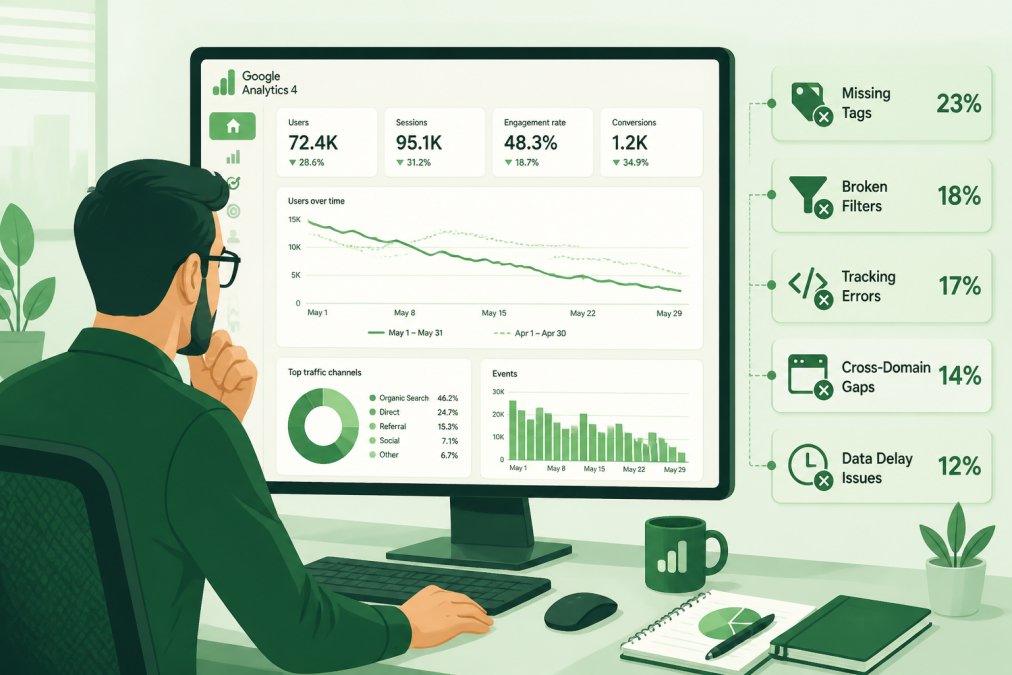
Here's a frustrating truth: sometimes your website traffic isn't actually dropping. Your tracking is just broken.
Misconfigured analytics accounts are responsible for more "traffic drops" than any algorithm update. A single mistake in Google Analytics 4 (GA4) configuration, a broken tracking pixel, or an incorrect filter can make your traffic appear to have vanished when it's actually still there.
Common GA4 Configuration Issues
- Tracking code not installed or recently removed from your site
- Incorrect property or stream configuration causing data to go to the wrong account
- Filters that exclude your own traffic applied incorrectly
- Enhanced ecommerce or conversion tracking disabled during a recent update
- Data sampling kicking in for high-traffic accounts
- View filters or data exclusion rules applied to your main reporting view
Third-Party Tracking Problems
- Conversion pixels from Facebook, LinkedIn, or other platforms not firing
- Broken UTM parameters in your marketing links
- Cookie consent changes blocking tracking scripts from loading
- Ad blockers or privacy tools preventing analytics scripts from running
The Verification Framework: Confirming if the Drop Is Real
Open Google Search Console and compare its traffic numbers to GA4. Search Console data comes directly from Google's index and is more reliable. If Search Console shows stable impressions and clicks while GA4 shows a drop, your tracking is the problem, not your rankings.
Layer 1: Google Search Console vs. GA4
- Open Google Search Console Performance report and set date range to match your GA4 report
- Note the total clicks and impressions for the period
- In GA4, go to Acquisition > Google Organic Search and compare the "Users" metric to GSC clicks
- GSC clicks should roughly align with GA4 users (allowing for a 5-15% variance)
Layer 2: Server Logs vs. Search Console
- Access your server logs through your hosting provider's control panel
- Filter logs for requests from Googlebot user agents
- Count successful requests (HTTP 200 status codes) during the same period as your traffic drop
- If Googlebot crawl volume is stable while GSC impressions dropped, the issue is indexing or ranking, not crawlability
Layer 3: Third-Party Crawler Verification
- Use a third-party SEO tool (Ahrefs, SEMrush, or Screaming Frog) to crawl a representative sample of your site
- Check for crawl errors, redirect chains, or noindex tags
- Compare the number of pages crawled by the third-party tool to the number indexed in GSC
Specific GA4 Configuration Audit Checklist
-
Verify tracking code installation: Go to GA4 Admin > Data Streams and note your Measurement ID (starts with G-). Search your site's page source for this ID.
-
Check for data exclusion filters: Go to Admin > Data Filters and review any active filters. If a filter is set to "Exclude" and its IP range is too broad, it may be filtering out legitimate traffic.
-
Review conversion tracking: If your traffic drop coincides with a conversion tracking change, go to Admin > Conversions and verify that key conversion events are still active.
-
Inspect session timeout settings: Go to Admin > Property Settings and check your session timeout duration (default is 30 minutes).
-
Verify no sampling is active: In GA4 reporting, check the bottom right of any report for a "Data is sampled" notification.
Seasonal Trends and Search Volatility
Not every traffic fluctuation is a crisis. Search demand varies by season, and some drops are entirely normal. Ecommerce sites see peaks around holidays and troughs in January. B2B SaaS companies experience lower search volume during summer months. Home improvement content peaks in spring.
To distinguish seasonal drops from real problems, compare your current traffic to the same period last year. If your July 2026 traffic is similar to July 2025, you're probably experiencing a seasonal pattern, not a ranking loss. Use Google Search Console's date comparison feature to overlay year-over-year data.
Website Traffic Recovery Strategy: Step-by-Step
Once you've diagnosed the cause, recovery follows a structured process.
Step 1: Document the Baseline Before making changes, record your current metrics. Note your traffic volume, top keywords, average ranking position, and indexing status.
Step 2: Implement the Fix Based on your diagnosis, execute the appropriate fix. For technical issues, fix server errors or update robots.txt. For content issues, rewrite thin pages or improve E-E-A-T signals. For tracking issues, correct your GA4 configuration.
Step 3: Allow Time for Recovery Technical fixes typically show improvement within 1-2 weeks. Content improvements take 4-8 weeks. Algorithm recovery can take 2-3 months.
Step 4: Monitor with Multiple Tools Track your recovery using Google Search Console (most reliable), GA4, and a third-party SEO tool. Search Console shows impressions and clicks. GA4 shows user behavior. Third-party tools show ranking changes.
Step 5: Identify Secondary Issues As your main problem resolves, secondary issues often emerge. Address these in priority order.
Verifying Your Traffic Drop with Third-Party Tools
Google Search Console is authoritative, but third-party tools provide additional perspective and verification. Using multiple data sources prevents you from chasing false signals and helps you distinguish between a real ranking loss, a tracking error, and a crawlability problem.
The Multi-Source Verification Matrix
Google Search Console (primary source for ranking health)
- Shows actual search impressions and clicks
- Reports keyword rankings and average position for each query
- Identifies crawl errors, indexing issues, and mobile usability problems
- Data is authoritative because it comes directly from Google's index
Google Analytics 4 (primary source for user behavior)
- Confirms user behavior after they arrive at your site
- Shows bounce rate, session duration, pages per session, and conversion data
- Identifies if traffic loss is from fewer clicks or fewer users converting
Ahrefs, SEMrush, or Similar Third-Party Tools (independent ranking verification)
- Track keyword rankings independently from Google
- Show competitive visibility and backlink changes
- Identify content gaps where competitors outrank you
Server Logs (technical verification)
- Show exactly how many times Googlebot crawled your site and whether it received successful responses
- Reveal 5xx server errors, redirect chains, or other technical issues
- Confirm whether crawl volume changed during your traffic drop period
Interpreting Misalignments: What Different Data Patterns Mean
Pattern 1: GSC shows declining impressions; third-party tools show stable rankings; GA4 shows stable traffic
- Diagnosis: Tracking configuration issue in GA4, not a real ranking loss
- Action: Audit GA4 configuration. Your rankings are fine; your analytics is broken.
Pattern 2: GSC shows declining impressions and clicks; third-party tools show stable rankings; GA4 shows declining traffic
- Diagnosis: Real ranking loss that third-party tools haven't detected yet, OR your site is ranking for queries with lower click-through rates
- Action: Wait 3-5 days for third-party tools to update. If they still show stable rankings, investigate whether your content is ranking for lower-intent keywords.
Pattern 3: GSC shows stable impressions and clicks; third-party tools show declining rankings; GA4 shows declining traffic
- Diagnosis: Your rankings dropped for high-traffic keywords, but GSC hasn't fully updated yet
- Action: Check GSC's "Average Position" metric specifically. If it increased (meaning lower rankings), the third-party tools are correct.
Pattern 4: All sources agree, GSC, third-party tools, and GA4 all show declining traffic
- Diagnosis: Real, confirmed ranking loss
- Action: Proceed with full diagnostic framework
Pattern 5: GSC shows declining impressions; server logs show stable Googlebot crawl volume; third-party tools show stable rankings
- Diagnosis: Indexing issue (pages are being crawled but not indexed), OR a noindex tag was accidentally applied
- Action: Check GSC Coverage report for "Excluded" pages. Verify robots.txt and meta robots tags.
Concrete Verification Workflow
-
Day 1: Establish baseline across all sources
- Record GSC impressions, clicks, and average position for the past 30 days
- Record GA4 users, sessions, and bounce rate for the same period
- Record third-party tool rankings for your top 20 keywords
- Note the exact date your traffic drop began
-
Day 2: Check server logs
- Access your server logs and filter for Googlebot requests
- Count successful crawls (HTTP 200) for the week before the drop and the week after
- If crawl volume dropped by more than 20%, you have a technical issue
-
Day 3-5: Wait for third-party tools to update
- Third-party tools typically update every 3-7 days
- Once they update, compare their ranking data to your GSC data
- If they align, you have a confirmed ranking loss
-
Day 5+: Identify the pattern and act
- Use the patterns above to determine your root cause
- Implement the appropriate fix
- Set up monitoring to track recovery across all sources
Conclusion: Moving Forward After a Traffic Drop
Website traffic dropping is stressful, but it's also diagnostic. The decline tells you something about your site, your content, or your tracking setup. The key is identifying what that signal means before you spend weeks chasing the wrong solution.
Start with the diagnostic framework: Is your drop sudden or gradual? Did it align with an algorithm update? Are your technical fundamentals solid? Is your tracking configured correctly? Once you've answered these questions, the fix usually becomes obvious.
GrandRanker helps founders recover from traffic drops by automating the keyword research, content optimization, and publishing workflow that keeps your organic visibility strong. When you're creating content consistently, updating existing pages with fresh insights, and optimizing for both Google and AI assistant citations, traffic drops become less catastrophic because your content pipeline is always working to rebuild visibility.
The sites that recover fastest aren't the ones with the biggest budgets. They're the ones with a systematic approach to SEO and the tools to execute it efficiently. Start your recovery today with a structured diagnostic process, implement the fixes that matter most, and monitor your progress across multiple data sources.
Start a free trial with GrandRanker and automate the content optimization that keeps your organic traffic growing. Our AI-powered platform handles keyword research, content creation, and optimization so you can focus on running your business while your search visibility recovers and grows.
| Diagnostic Category | What to Check | Primary Tool | Expected Timeline |
|---|---|---|---|
| Sudden drops | Server errors, crawl issues, algorithm updates | Google Search Console | 1-2 weeks |
| Gradual declines | Content quality, keyword rankings, competition | SEMrush / Ahrefs | 4-8 weeks |
| Tracking problems | GA4 configuration, pixels, filters | Google Analytics 4 | 1-3 days |
| Seasonal patterns | Year-over-year comparison, search demand | Google Search Console | N/A (expected) |
| Technical issues | Redirects, canonicals, robots.txt | Google Search Console URL Inspector | 1-2 weeks |
Frequently Asked Questions
How do I determine if my website traffic drop is due to a Google algorithm update?
Check Google Search Console for manual actions and review the timeline of your traffic drop against known algorithm updates (Core Updates, Helpful Content Update, etc.). Cross-reference your drop date with Google's official announcements. If your drop aligns with an update date and affects multiple keywords across your site, it's likely algorithm-related. Use third-party SEO tools to compare your visibility against competitors, if they dropped too, the update likely caused it. If only your site dropped, focus on content quality, E-E-A-T signals, and technical factors instead.
What's the difference between a sudden traffic drop and gradual decline, and why does it matter?
Sudden drops (within hours or days) typically signal technical issues, server downtime, or algorithm penalties. Gradual declines (weeks to months) usually indicate content quality problems, increased competition, or seasonal trends. Sudden drops require immediate action on indexing status and HTTP status codes. Gradual drops need content audits and keyword ranking analysis. Identifying which you're experiencing determines your diagnostic path and recovery timeline. Check Google Search Console crawl stats and indexing status first for sudden drops; review organic traffic source and referral traffic patterns for gradual ones.
Can Google algorithm updates and AI-generated search results both cause traffic drops?
Yes. Algorithm updates directly affect your SERP rankings and click-through rates. AI-generated search results (like AI overviews in Google Search) can reduce clicks to your site even if your ranking stays the same, users get answers directly in the search results without visiting your page. Monitor both your keyword rankings in Search Console and your actual click-through rate. If rankings are stable but traffic dropped, AI search results or zero-click searches may be the cause. If rankings fell, focus on algorithm recovery and content quality improvements.
How long does it take to recover from a significant website traffic drop?
Recovery time depends on the cause. Technical fixes (broken redirects, indexing problems) can show results within days once crawl budget normalizes. Manual penalties may take weeks after you submit a reconsideration request in Google Search Console. Algorithm-related drops typically require 2-4 weeks of improved content and E-E-A-T signals before rankings recover. Seasonal traffic drops reverse naturally when the season returns. Start with a technical audit, then monitor Google Search Console weekly for crawl errors, indexing status, and ranking improvements. Document your fixes to track progress.
This article was written using GrandRanker